
HubSpot x EVERY8D
Make SMS a step in your HubSpot workflows
Many teams already use HubSpot workflows to send emails, update records, and notify sales reps. SMS, however, still means logging in to a separate platform, importing a list, and sending messages by hand. HubSpot x EVERY8D adds a "Send SMS" action to your workflows and delivers each message through EVERY8D. You can check the delivery result of every message.
How it works
Connecting HubSpot and SMS
HubSpot workflows decide when to send, based on triggers such as a form submission or a completed payment. EVERY8D delivers each message using your own EVERY8D account and credits. Hububble SMS Console records the delivery status and credits used for every message, and logs it to the contact's timeline in HubSpot.
One workflow
SMS and email in the same workflow
Emails, internal notifications, and property updates already run automatically in HubSpot workflows. Now SMS can be set up in the same place. One trigger can send an email, send an SMS, and notify a sales rep at once, with no need to configure two systems. For example, after sending an event reminder email, you can follow up with an SMS to recipients who haven't opened it, so important notices don't sit unread in the inbox.
Delivery tracking
Check the result of every message
Sending a message doesn't mean the customer received it. The SMS Log in Hububble SMS Console records the send time, delivery status (delivered, failed, or pending), and credits used for each message. Failed messages are easy to spot, so your team can decide whether to resend, switch to email, or follow up by phone.
Automation
Let workflows handle routine notifications
Payment confirmations, appointment reminders, shipping notices, overdue reminders, event check-ins, and form confirmations happen every day with similar content. When workflows send them automatically, your team no longer imports lists or copies content each day, and no notice is missed.
CRM timeline
Every message logged on the contact timeline
The send time, content, sending workflow, and send result of every message are logged on the contact's timeline in HubSpot. Marketers can see every SMS sent to a contact right on the contact record. When a customer calls with a question, sales and support reps don't need to check with marketing.

About EVERY8D
Messages delivered by EVERY8D
EVERY8D is an enterprise SMS platform connected to Taiwan's three major telecom carriers. It supports high-volume sending and API integration, and offers dedicated short codes so recipients can recognize which company sent the message.
Teamplus Technology

Features
Send and track without writing code
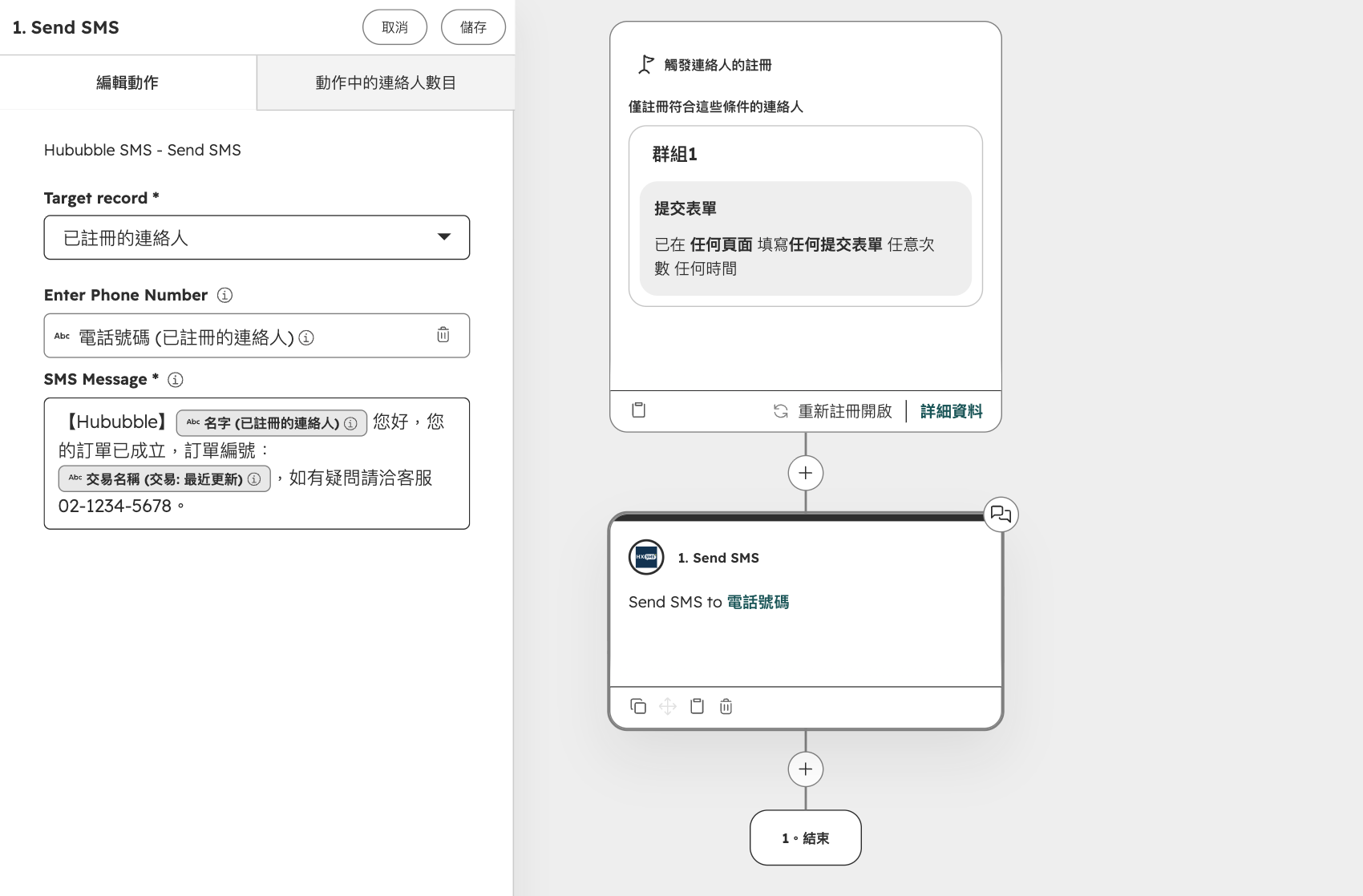
Automated sending
Send SMS from a workflow
Add a "Send SMS" action to any HubSpot workflow, the same way you add an email. Message content can include HubSpot properties such as name, order number, or appointment time.
-
Event triggers
Send an SMS automatically when a customer submits a form, completes a payment, or a deal moves to the next stage.
-
Scheduled reminders
Use workflow delays to send reminders the day before an appointment or 30 days before a contract expires.
-
If/then branches
Use workflow branches to send different content to members and non-members, and stop payment reminders once a customer has paid.
-
Links
Include payment, booking, or form links so customers can take the next step in one tap.
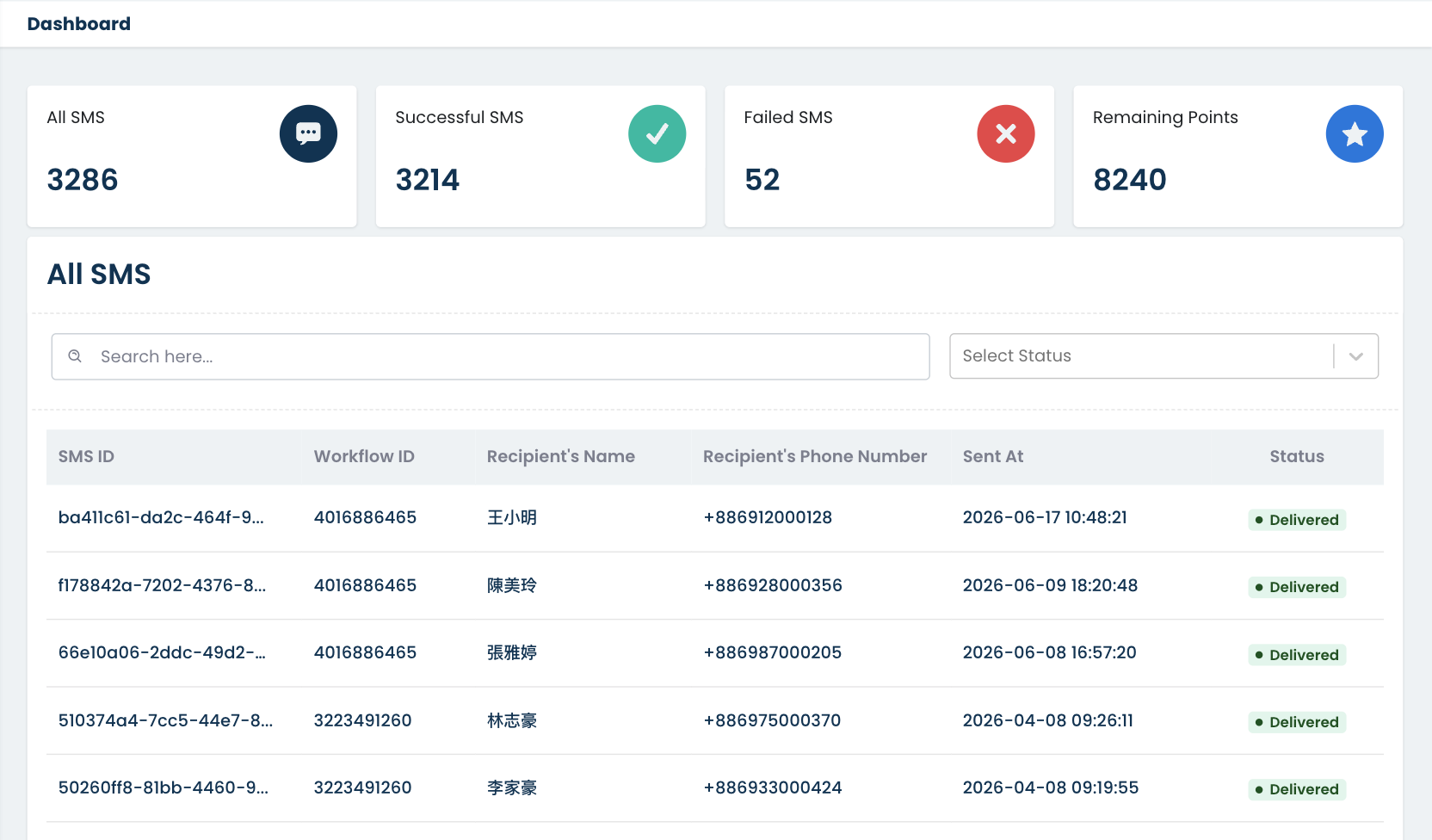
Message log
Look up every message
The Hububble SMS Console dashboard shows total messages sent, delivered, and failed, along with your remaining EVERY8D credits. The SMS Log shows the details of every message.
-
Per-message records
Recipient, phone number, message content, triggering workflow, send time, and delivery status.
-
Automatic status updates
The latest status of each message (delivered, failed, or pending) is retrieved from EVERY8D automatically, with no need to log in to EVERY8D.
-
Search and filter
Find a message by recipient or message ID.
-
Synced to HubSpot
Send records are logged on the contact's timeline.
Find out which notifications to automate
We'll first confirm your HubSpot subscription, then estimate the cost based on your monthly sending volume.
Book a consultation
FAQ
Frequently Asked Questions
Which HubSpot subscription do I need?
Professional or Enterprise of any Hub, because messages are sent from workflows. Free and Starter plans don't include workflows, and Content Hub on its own isn't supported. If you're not sure whether your subscription qualifies, tell us your plan and we'll confirm.
How is pricing calculated?
Pricing has two parts. The first is the Hububble integration service fee, tiered by monthly sending volume, starting at NTD 3,500 per month (billed annually). The second is the EVERY8D SMS fee: you purchase credits directly from EVERY8D.
How long does setup take, and what do I need to prepare?
Standard setup takes about 7–14 business days. A Hububble project manager handles configuration and testing and provides a user guide. Before setup, please prepare:
- An EVERY8D account with SMS sender identity verification completed
- Carrier review of any links used in your messages
- An invitation for Hububble to join your HubSpot portal with Partner Admin access
- Your EVERY8D login credentials, shared through an encrypted method
The timeline depends mainly on EVERY8D account approval and link review. If you don't have an EVERY8D account yet, allow an extra 1–2 weeks.
How can I check the status of my messages?
Hububble SMS Console shows the send time, delivery status, and credits used for every message. Send records are also logged on the contact's timeline in HubSpot.
Can messages be personalized or scheduled?
Yes. Message content can include HubSpot properties such as name, order number, or appointment time. Send timing is controlled by workflow delays and scheduling, for example a reminder the day before an appointment.
Contact Us
Let's Make It Happen!